Upload any animated GIF sprite sheet source. Remove the background, scale to exact game-engine dimensions, and download a transparent APNG animation and a spritesheet PNG in one step.
Presets: 128×128, 256×256, 512×512 · Custom W×H · Center or bottom anchor
Every processed GIF generates a grid PNG spritesheet — ready for Unity, Godot, Phaser, and Pygame
Process up to 5 sprites at once with the same settings — download all as a ZIP
Full 8-bit alpha channel — no GIF dithering artefacts. Supported in all modern browsers and game engines
Tip: set canvas to 256×256, anchor to Bottom for character sprites
Real outputs from a real GIF — no mockups.
Every frame packed into a grid PNG. Drop it directly into Unity, Godot, Phaser, or any engine that reads spritesheets.
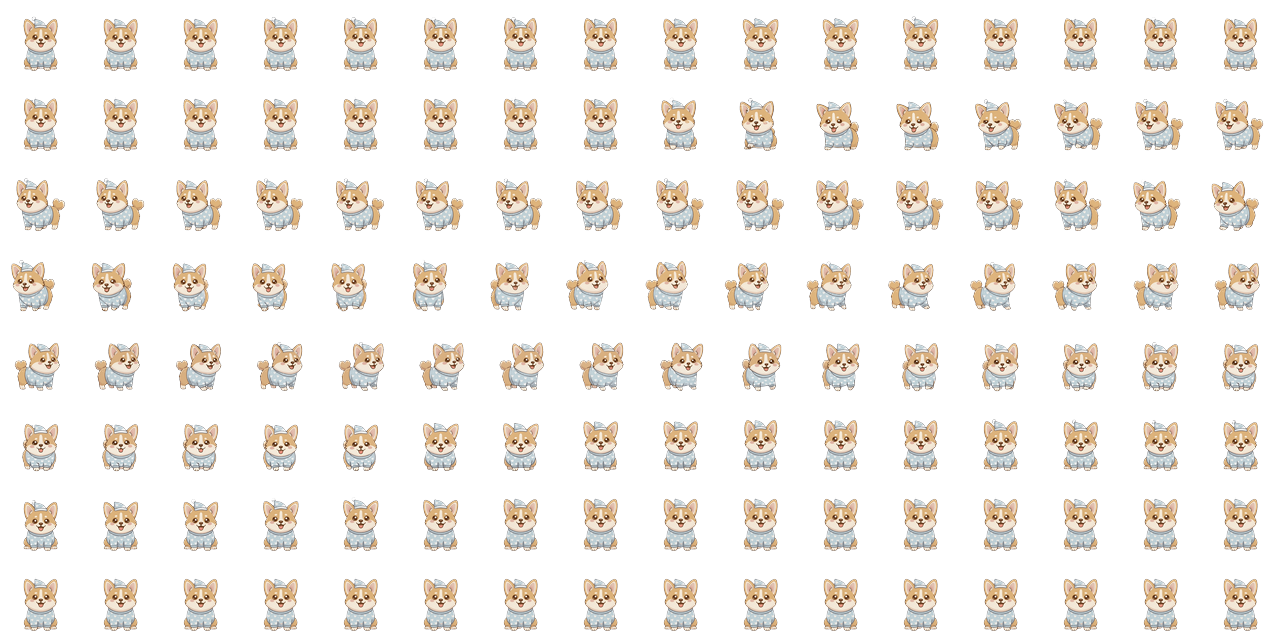
Analyzes pixel motion frame-by-frame and outputs a 0→1 travel value per frame. Holds at 0 during idle lead, advances during stride, holds at 1 on trail — so the character's on-screen position stays locked to actual leg movement.
// 128 frames · idle_pad=1 · hold_lead=3 · hold_trail=5
const _kPaceTravelByFrame = <double>[
0.0000, 0.0000, 0.0000, 0.0000, 0.0000, 0.0000,
// … idle lead — character sitting before walk …
0.0244, 0.0488, 0.0732, 0.0976, 0.1220, 0.1463,
0.1707, 0.1951, 0.2195, 0.2439, 0.2683, 0.2927,
// … advancing through stride …
0.8780, 0.9024, 0.9268, 0.9512, 0.9756, 1.0000,
1.0000, 1.0000, 1.0000, 1.0000, 1.0000, 1.0000,
// … idle trail — character settling after walk …
];
AI models trained on photography get confused by flat cartoon colour
Set the method to Auto and RemoveGifBG will pick flood-fill automatically when it detects a flat background.
Unity, Godot, Phaser.js, and most web-based engines can import PNG sequences or read APNG as a standard PNG. Use the spritesheet download for engines that need frame-by-frame PNGs.
RemoveGifBG computes a union bounding box across all frames before cropping, so subjects stay aligned regardless of per-frame position. The crop is spatially consistent across the animation.
For character sprites, Bottom anchor places the subject at the bottom of the canvas so feet always touch the ground plane — the standard convention for platformer and RPG assets.
Yes — Flood fill works excellently on pixel art with solid-colour backgrounds. Set a low tolerance (8–12) for sharp pixel edges. Avoid the AI method for pixel art as it may soften edges.